📱 Secure Zoho CRM Access with Microsoft Intune #
Zero Trust Device Security for Your Sales & CRM Hub #
Your sales and support teams access critical deals, contact databases, and analytics from everywhere—office laptops, home PCs, or mobile devices.
IT Partner's Zoho CRM + Intune Integration ensures only secure, managed, and compliant devices can access your valuable sales data.
🔒 What This Integration Does #
We connect Microsoft Intune with Zoho CRM to enable:
- 📱 Device compliance enforcement before granting Zoho CRM access
- 🛡️ Conditional Access via Microsoft Entra ID (based on location, device risk, user role)
- 📁 App protection policies for the Zoho CRM mobile app and browser sessions
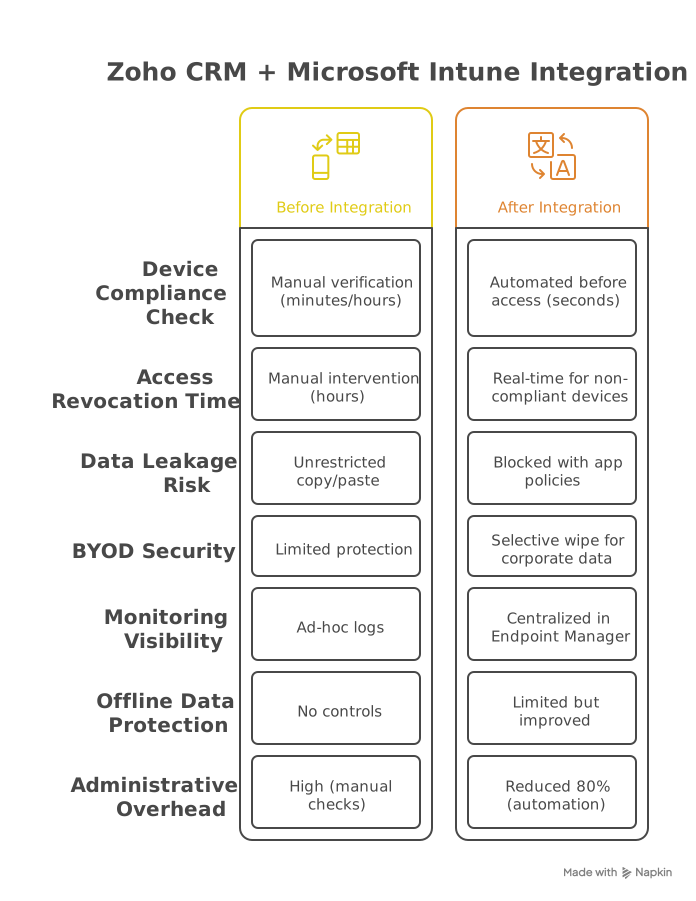
- 🚨 Real-time access revocation for lost, stolen, or non-compliant devices
- 📊 Centralized monitoring of all device access patterns in Microsoft Endpoint Manager

💡 Why It Matters #
Without Intune:
- ❌ Zoho CRM accessed from unsecured personal devices, risking data leakage
- ❌ No control over data copying, pasting, or saving from the Zoho CRM mobile app
- ❌ Lost or stolen devices remain an open gateway to your sales assets and customer data
With Intune:
✅ Block access from jailbroken, outdated, or non-compliant devices
✅ Prevent data leakage via copy/paste and save-as restrictions in the Zoho CRM mobile app
✅ Remotely wipe only corporate data from Zoho CRM without affecting personal content on employee-owned devices
🚀 Key Benefits #
- Enforce Zero Trust Access: Ensure only compliant, trusted devices can access your Zoho CRM portal, protecting your sales IP and customer database.
- Enable Secure Mobile Work: Sales teams access Zoho CRM from any device while maintaining enterprise-grade security.
- Reduce Data Breach Risk: Automatically detect and block risky access attempts, preventing unauthorized data exposure.
- BYOD Compliance: Secure corporate data on personal devices without full device management.
- Centralized Control: Manage Zoho CRM access policies from Microsoft Endpoint Manager alongside other apps.
⚙️ How It Works #
-
Device Enrollment and Compliance:
- Enroll devices in Intune for compliance monitoring
- Configure compliance policies (OS version, encryption, jailbreak detection)
-
Conditional Access Setup (requires Entra ID P1/P2):
- Create Conditional Access policies for Zoho CRM SSO
- Access attempts are evaluated in real-time by Entra ID Conditional Access
- Non-compliant devices are blocked from accessing Zoho CRM data
Technical Requirements:
- Zoho CRM Professional or Enterprise tier (required for SAML/SSO)
- Microsoft Intune Plan 1 (included in Microsoft 365 Business Premium, E3, or E5)
- Microsoft Entra ID P1 (minimum requirement for Conditional Access)
⚠️ Limitations #
- Browser-based access: Primary control is granting or denying access to the session; fine-grained in-session controls are limited.
- Windows/Mac desktop apps: These typically require third-party MDM solutions for full device-level management beyond browser control.
- Offline data: Protection of downloaded data for offline use may have limitations depending on the device and app version.
🎯 Who's This For? #
- Sales teams with remote members accessing Zoho CRM from various locations and devices.
- Companies storing PII in Zoho CRM (contact details, form submissions) requiring compliance with data protection laws.
- IT teams supporting a BYOD (Bring Your Own Device) culture who need to secure corporate data on personal devices.

🏆 Why Choose IT Partner LLC #
- Microsoft Intune Specialists: Deep expertise in deploying and configuring modern endpoint management.
- Zoho CRM Integration Experience: Proven track record of securing sales SaaS platforms.
- Business-Outcome Focus: We implement solutions that balance robust security with user productivity.

💬 Enable Secure & Productive Access to Zoho CRM Today #
Protect your sales data and empower your team with secure, mobile access.