Connect Zoho CRM with Microsoft Teams to automate deal alerts, centralize sales approvals, and improve team collaboration directly within Teams using Power Automate. Pricing and timeline are customized after scoping.
💬 Zoho CRM + Microsoft Teams Integration
Accelerate deals and streamline sales approvals — right in Teams.
Switching between Zoho CRM and Teams delays responses and creates visibility gaps for sales teams.
With IT Partner's Zoho CRM + Microsoft Teams Integration, your team can:
- Get real-time deal alerts in Teams channels when key metrics change
- Approve sales content and budgets directly from Teams messages
- Collaborate on deals with Zoho CRM data embedded in Teams chats
🔗 What This Integration Does
We connect Microsoft Teams with Zoho CRM to enable:
- Automated deal alerts in Teams channels (e.g., "Deal reached 80% of target!")
- Approval workflows triggered from Teams that update Zoho CRM records
- Teams tabs with Zoho CRM data (Deals, Contacts, Performance dashboards)
- @mentions in Teams that create Zoho CRM tasks and follow-ups

💡 Why It Matters
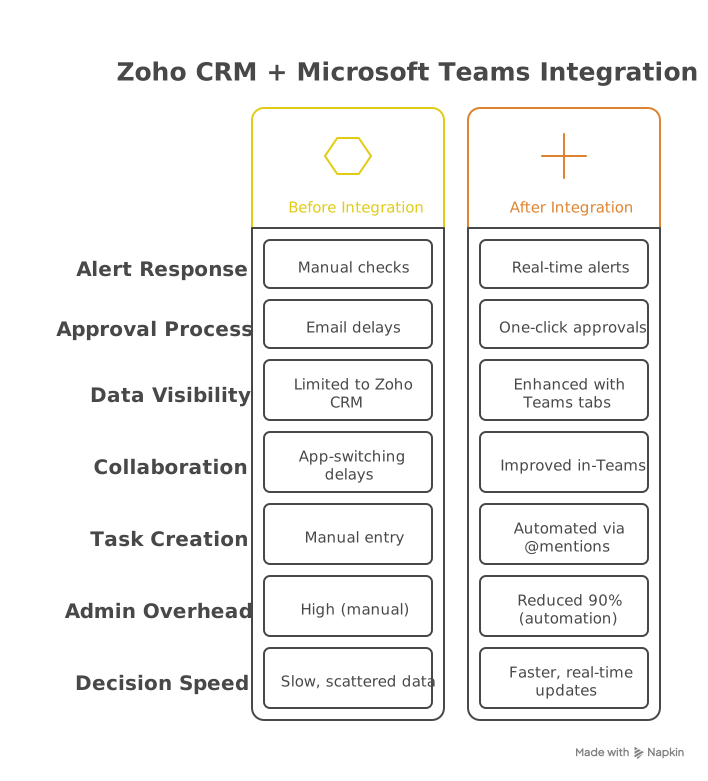
Without integration:
- Sales teams waste significant time switching between collaboration and CRM tools
- Deal approvals get delayed in email chains and separate systems
- Real-time deal performance visibility is limited across the organization
With integration:
- ✅ Real-time deal visibility in Teams channels
- ✅ One-click approvals that update Zoho CRM instantly
- ✅ Reduced app-switching with embedded sales data
- ✅ Faster decision-making with immediate team collaboration
🚀 Key Benefits
- Faster deal execution (reduced response time to performance changes)
- Centralized collaboration with Zoho CRM context directly in Teams
- Secure approvals using Azure AD permissions and Zoho CRM roles
- Customizable alerts for goal achievements, budget thresholds, or performance changes
- Improved cross-team alignment between sales, support, and leadership
⚙️ How It Works
- Build Power Automate flows using:
- Zoho CRM REST API for deal updates and data retrieval
- Teams webhooks for real-time notifications and alerts
- Azure Logic Apps for complex workflow automation
- Embed Zoho CRM tabs in Teams channels for:
- Deal performance dashboards
- Contact lists and engagement metrics
- Sales analytics and reports
- Set up approval workflows:
- Teams message → Zoho CRM record updates
- Content approval processes
- Budget authorization workflows
Technical Notes:
- Uses Zoho CRM Webhooks for real-time event notifications (<5 sec delay)
- Requires Power Automate Premium for custom connectors and advanced workflows
- Supports Zoho CRM Professional or higher features
- OAuth 2.0 authentication for secure API connections
🎯 Who's This For?
- Sales teams using Zoho CRM and Teams daily for deal management
- Sales operations needing real-time deal performance visibility
- Content teams requiring streamlined approval processes
- Sales managers overseeing budget and deal approvals
- Agencies managing multiple client deals and teams

🏆 Why Choose IT Partner
- Zoho CRM Certified Experts + Microsoft expertise
- Pre-built templates for common sales workflows and approvals
- End-to-end security with Azure AD integration and compliance
- Sales technology specialists with deep platform knowledge
- 24/7 support and ongoing optimization services

💬 What's Next?
Let's connect your sales and collaboration tools for better deal execution:
Transform your sales collaboration with seamless Zoho CRM and Teams integration.