📬 IT Partner's Zoho CRM + Microsoft Outlook Integration #
Close deals faster—without leaving Outlook. #
Tired of switching between Outlook and Zoho CRM to log emails or track sales interactions?
Do critical customer communications get lost in endless email threads?
With IT Partner's Zoho CRM + Microsoft Outlook Integration, your sales team can log emails, sync calendars, and trigger workflows directly from Outlook—eliminating manual data entry and accelerating your sales execution.
🔄 What This Integration Does #
We connect Microsoft Outlook (desktop, web, and mobile) with Zoho CRM, enabling your team to:
- Log emails to Zoho CRM automatically (attached to Contacts, Deals, or Accounts)
- Sync Outlook calendars with Zoho CRM Sales Activities and Pipelines
- Trigger sales workflows (e.g., follow-up tasks, deal approvals) from flagged emails or calendar events
- Embed actionable buttons in Outlook emails (e.g., "Log to Zoho CRM" or "Approve Deal")
- Build advanced automations using Power Automate (e.g., SLA reminders based on email responses)

📌 Why It Matters #
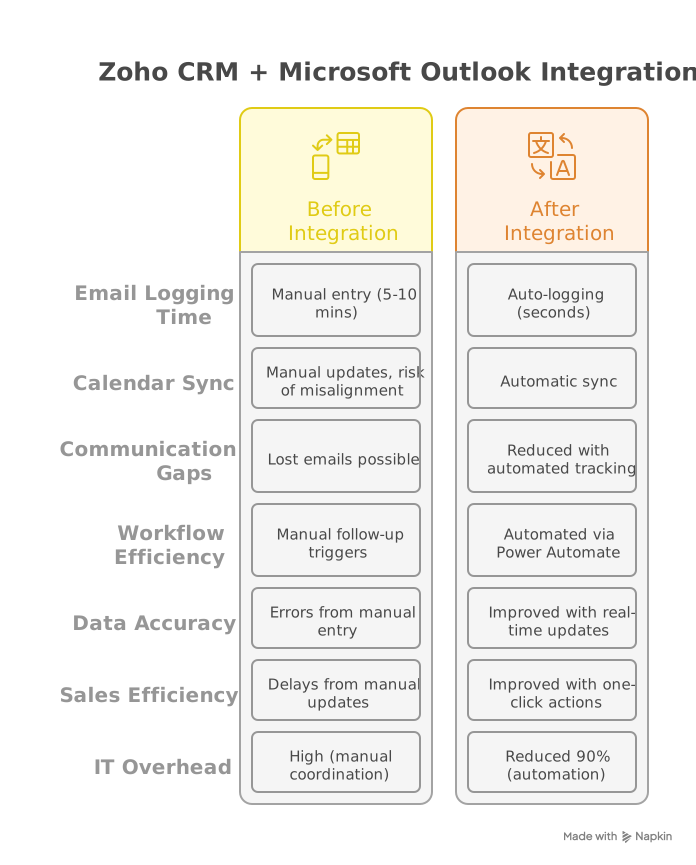
Without integration:
- Sales teams waste 4-6 hours/week on manual CRM updates and data entry
- Deal approvals stall in email chains and communication gaps
- Customer engagement data remains siloed across platforms
With this integration:
- ✅ Log emails/meetings to Zoho CRM with one click
- ✅ Automate follow-ups and deal approvals from Outlook
- ✅ Keep Zoho CRM data accurate and up-to-date in real-time
🚀 Key Benefits #
- Reduce manual work: Eliminate double-entry between Outlook and Zoho CRM
- Shorten sales cycles: Trigger follow-ups and approvals directly from emails
- Improve data accuracy: Auto-sync customer communications to sales records
- Enhance visibility: Full engagement history in Zoho CRM for better deal analysis
- Increase sales ROI: More time spent on closing deals, less on administrative tasks
⚙️ How It Works #
- Connect Zoho CRM to Outlook using Microsoft Graph API and Zoho CRM REST API
- Log emails/events to Zoho CRM via Power Automate or custom middleware
- Trigger workflows: Flagged emails create Zoho CRM Tasks; calendar events sync as Sales Activities
- Optional: Build multi-step approvals (e.g., Outlook replies → Zoho CRM approval processes)
Note: Uses Zoho CRM Events API for comprehensive email tracking and Sales Activities for synchronization. Custom properties and field mappings fully supported.
Security: All integrations enforce TLS 1.2+ and require least-privilege API permissions with OAuth 2.0 authentication.
🎯 Who's This For? #
- Sales teams using Zoho CRM and Outlook daily for deal management
- Sales managers needing real-time deal visibility and performance tracking
- Operations teams tired of manual sales data cleanup and synchronization
- Organizations wanting unified customer engagement tracking across platforms

🏆 Why Choose IT Partner LLC #
- Microsoft expertise + Zoho CRM Certified Experts
- API-first approach: Secure, scalable integrations using REST/OAuth 2.0
- End-to-end service: Design → deploy → support → optimize
- 24/7 monitoring: Continuous performance tracking and maintenance
- Sales automation specialists: Deep understanding of sales workflows and metrics

💬 What's Next? #
Let's automate your sales workflows and eliminate manual data entry busywork.
Transform your sales operations with seamless Zoho CRM and Outlook integration.